Regarding electronic circuits and power supply units, the bridge rectifier plays a crucial role in converting alternating current (AC) to direct current (DC). Ensuring the proper functioning of a bridge rectifier is essential for the overall performance of electronic devices. In this article, we will delve into the significance of testing bridge rectifiers and provide valuable insights for optimizing their operation.
How to Test a Bridge Rectifier Without Removing It from the Circuit
You can perform a preliminary test of a bridge rectifier without desoldering it from the PCB. However, other components connected to the rectifier, such as capacitors, resistors, transformers, and parallel diode paths, may affect the multimeter readings.
Follow these steps to check a bridge rectifier while it is installed on a circuit board.
Step 1: Disconnect the Power Supply
Before testing, completely disconnect the equipment from its power source.
If the circuit contains a large filter capacitor, discharge it safely using an appropriately rated resistor and verify the voltage with a multimeter before touching the circuit.
Never short a capacitor directly with a screwdriver.
Step 2: Identify the Bridge Rectifier Terminals
Most bridge rectifiers have four terminals:
- AC1 (~): First AC input
- AC2 (~): Second AC input
- Positive (+): DC positive output
- Negative (−): DC negative output
Check the markings printed on the rectifier body or consult its datasheet to identify the terminals correctly.
Step 3: Set the Multimeter to Diode Mode
Set your digital multimeter to diode test mode.
A bridge rectifier contains four internal diodes. You can perform preliminary checks by testing the diode paths between the AC input and DC output terminals.
For a typical bridge rectifier:
| Test | Red probe | Black probe | Expected result |
|---|---|---|---|
| 1 | AC1 (~) | Positive (+) | Forward voltage drop |
| 2 | Positive (+) | AC1 (~) | OL or no conduction |
| 3 | AC2 (~) | Positive (+) | Forward voltage drop |
| 4 | Positive (+) | AC2 (~) | OL or no conduction |
| 5 | Negative (−) | AC1 (~) | Forward voltage drop |
| 6 | AC1 (~) | Negative (−) | OL or no conduction |
| 7 | Negative (−) | AC2 (~) | Forward voltage drop |
| 8 | AC2 (~) | Negative (−) | OL or no conduction |
A healthy bridge rectifier typically shows a forward voltage drop across each internal diode, often around 0.4–0.8 V for conventional silicon diodes, depending on the device and test current.
Step 4: Interpret the Multimeter Readings
Observe the readings.
- Very low voltage in both directions: May indicate a shorted diode.
- OL in both directions: May indicate an open diode, but circuit connections can also affect the result.
- Normal forward drop in one direction and OL in reverse: Indicates normal diode-like behavior for that particular path.
Step 5: Confirm the Result
If all readings appear normal, the bridge rectifier may be working correctly. However, an in-circuit test cannot always confirm that the component is healthy.
Other components connected in parallel may create alternative current paths and produce misleading readings.
For a reliable diagnosis, isolate at least one AC or DC terminal, or remove the bridge rectifier completely and repeat the test.
Important: An in-circuit multimeter test is a preliminary check, not a complete load or operating-voltage test. A rectifier may pass the diode test but still fail under operating conditions.
Understanding the Basics:
Before we dive into the testing procedures, let’s briefly revisit the fundamentals of a bridge rectifier. The bridge rectifier is a key component in power supply circuits and is responsible for converting AC to pulsating DC. The diodes within the bridge rectifier enable the flow of current in one direction, smoothing out the waveform and providing a consistent DC output.
- Full-Wave Bridge Rectifier with Capacitor Filter: Circuit & Formula
- How to Test SCR with a Multimeter (Digital & Analog Step-by-Step)
For those seeking a detailed explanation of the operation, please follow this link for an in-depth look: Full-Wave Bridge Rectifier Operation with Capacitor Filter.
Why Testing is Crucial:
Testing bridge rectifiers is a critical step in ensuring the reliability and efficiency of electronic circuits. Identifying potential issues early on can prevent malfunctions and enhance the lifespan of the overall system. Here are some key reasons why testing is crucial:
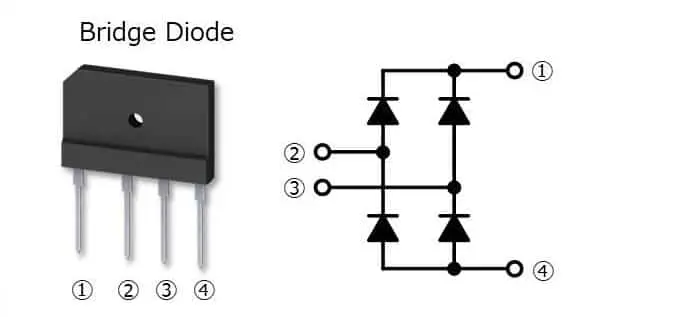
- Fault Detection: Testing allows for detecting faulty diodes or other components within the bridge rectifier. Identifying and replacing defective parts can prevent circuit failures and ensure a stable power supply.
- Performance Optimization: By testing the bridge rectifier, you can fine-tune its operation for optimal performance. This involves checking for voltage drops, ensuring proper current flow, and validating that the rectifier meets the specified electrical parameters.
- Preventing Overheating: Overheating is a common issue in electronic components. Through testing, you can identify any signs of excessive heat in the bridge rectifier and take preventive measures to avoid potential damage.
How to Test a Bridge Rectifier with a Digital Multimeter:
Let’s explore the step-by-step process of testing a bridge rectifier using a digital multimeter. This simple yet effective method can help you diagnose potential problems quickly.
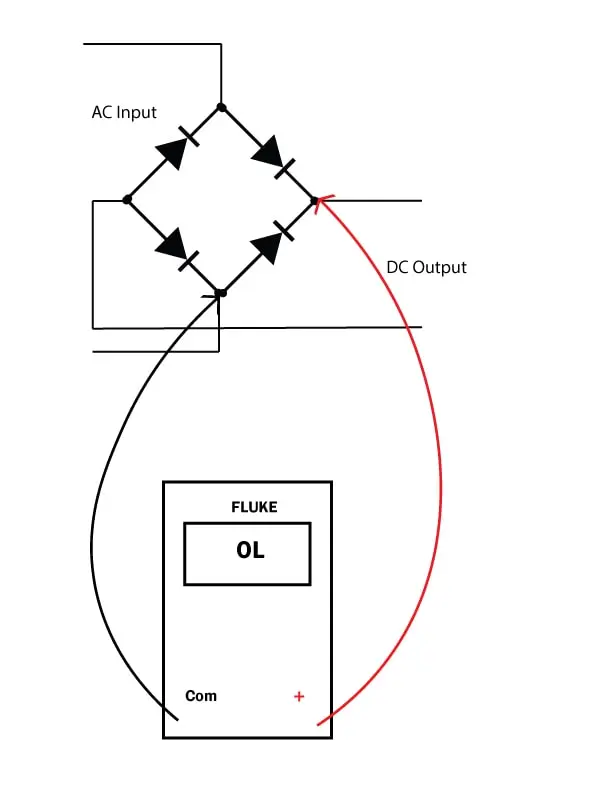
Reversed Biase
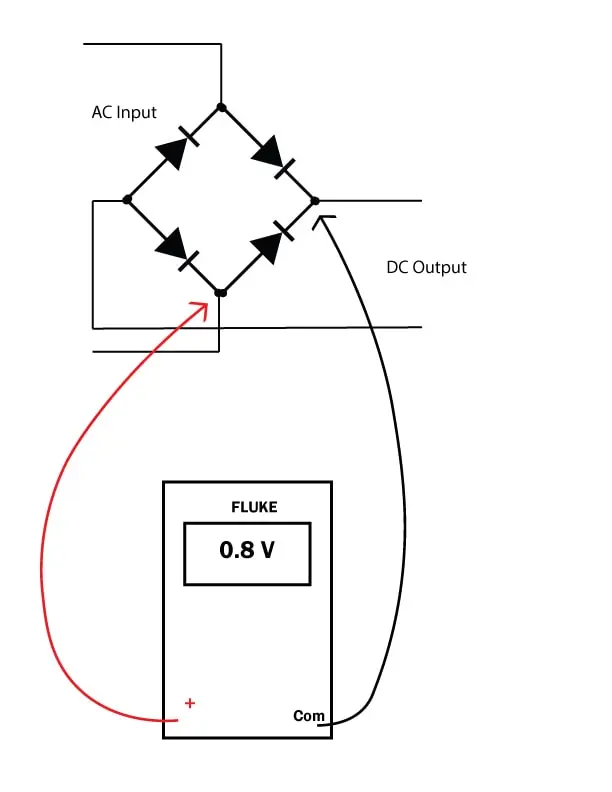
- Safety First: Before testing, always ensure the power to the circuit is turned off. Safety is paramount when dealing with electronic components.
- Multimeter Settings: Set your digital multimeter to the diode/continuity testing mode. This mode allows the multimeter to measure the voltage drop across the diode, providing insights into its health.
- Diode Identification: Bridge rectifiers consist of four diodes, and it’s essential to identify them. Refer to the rectifier’s datasheet or circuit diagram to locate the anode and cathode of each diode.
- Testing Individual Diodes: Place the multimeter’s positive probe on the anode and negative on the cathode of each diode. A healthy diode should display a voltage drop of around 0.5 to 0.7 volts. The diode may be faulty if the reading is significantly lower or higher.
- Reverse Polarity Test: Swap the multimeter probes, placing the positive probe on the rectifier’s cathode terminal and vice versa. The voltage drop should be extremely high. If the multimeter shows a low voltage drop, it indicates a faulty diode.
- Check for Short Circuits: Use the multimeter in resistance mode to check for short circuits across the bridge rectifier input and then output. A low resistance reading may indicate a short circuit. A short circuit means a faulty circuit.
How to Test a Bridge Rectifier Outside the Circuit
Testing a bridge rectifier outside the circuit is generally more reliable because other electronic components cannot interfere with the multimeter readings.
Follow these steps:
- Disconnect the equipment from the power supply and safely discharge its filter capacitors.
- Desolder and remove the bridge rectifier from the PCB.
- Identify the four terminals: AC1, AC2, positive (+), and negative (−).
- Set your digital multimeter to diode mode.
- Perform the eight diode tests listed in the previous section.
- Compare the forward and reverse readings.
A healthy silicon bridge rectifier should normally show a forward voltage drop across each internal diode and OL when the probes are reversed.
How to Identify a Faulty Bridge Rectifier
The following observations can help identify common faults:
- Shorted diode: Low or nearly zero voltage drop in both directions across a diode junction.
- Open diode: OL in both directions across a diode junction.
- Normal diode: Forward voltage drop in one direction and OL in the reverse direction.
If one or more internal diodes fail these tests, replace the bridge rectifier with a suitable equivalent having compatible voltage and current ratings.
FAQs
Can You Test a Bridge Rectifier Without Desoldering It from the Circuit Board?
Yes, you can perform a preliminary bridge rectifier test without desoldering it from the circuit board. Disconnect the power supply, safely discharge the filter capacitor, and use a digital multimeter in diode mode to check the four internal diode paths.
However, other components connected to the rectifier can affect the readings and produce misleading results. If the multimeter readings are abnormal or unclear, disconnect at least one terminal of the rectifier or remove it completely for accurate testing.
How Do You Know If a Bridge Rectifier Is Bad?
A bridge rectifier may be faulty if one of its internal diodes shows a short circuit or an open circuit during diode testing. A shorted rectifier can also cause excessive current, blown fuses, or incorrect DC output voltage.
Can a Bridge Rectifier Work with One Bad Diode?
A bridge rectifier with one damaged diode may still produce some DC output, but its full-wave rectification will be affected. The output may contain excessive ripple, reduced voltage, or other abnormalities. Replace a faulty bridge rectifier rather than relying on its partial operation.